


By the end of 2026, that small sliver of plastic in your phone will be a relic of the past as the UK mobile market pivots toward a digital-only standard. Switching to esim from physical sim is no longer just a technical upgrade for enthusiasts; it is a strategic move for anyone seeking digital freedom and modern convenience. You likely value your current mobile number, and the thought of losing it during a technical migration or facing unexpected downtime is understandably daunting.
We believe that upgrading your tech should be an empowering experience, not a stressful one. This checklist ensures you achieve a successful, instant digital activation while keeping your existing UK mobile number exactly where it belongs. It is about making a smart, informed choice to move away from cumbersome traditional methods and toward a more flexible, dual-SIM lifestyle.
We will walk you through the essential steps to verify your device compatibility and navigate the porting process without the usual faff. From requesting your digital profile to hitting that final activation button, you will learn how to transition to a hardware-free connection with total professional confidence.
Key Takeaways
- Understand why the 2026 transition to digital-first connectivity offers instant activation and removes the need for physical delivery.
- Check your handset compatibility and network status to ensure your device is ready for a hardware-free upgrade.
- Master the exact sequence for switching to esim from physical sim using a simple QR code and your phone's internal settings.
- Learn how to navigate the UK's PAC code system to protect your mobile number and maintain seamless connectivity during the switch.
- Explore how SimOnly Club provides unlimited data plans for residents and visitors with a focus on digital-first simplicity.
Understanding the Shift: Why Switch to eSIM in 2026?
The transition to digital connectivity is moving at a rapid pace. An eSIM is essentially a small, programmable chip built directly into your phone motherboard. Unlike the removable plastic cards we've used for decades, this hardware is permanent and rewriteable. If you want a deep dive into the technical background, you can find eSIM technology explained in detail through historical archives. For most of us, the shift is about convenience. Switching to esim from physical sim means you no longer have to wait for a piece of plastic to arrive in the post. Activation happens in seconds through a QR code or a simple app download.
Security is another major driver for this change. If your phone is unfortunately stolen, a thief can easily pop out a physical SIM to prevent you from tracking the device. An eSIM is different. It's embedded, so it cannot be removed. This keeps your connection active and helps you locate your handset more effectively. Beyond personal safety, there's the benefit of digital decluttering. By removing the need for plastic cards and bulky packaging, we're collectively reducing environmental waste. It's a cleaner, more efficient way to stay connected.
The Benefits of Going Digital
One of the greatest advantages is the ability to run dual-SIM setups. You can keep your personal number and a dedicated work line active on the same handset without swapping cards. This flexibility extends to travel. If you're heading abroad, you can easily add Visitor eSIM Plans or Unlimited Data In the EU whilst keeping your primary UK number reachable for important calls. You can organise and manage multiple profiles directly through your phone settings, switching between them with a few taps.
Is the Physical SIM Card Dead?
We've reached a tipping point in 2026. Most flagship smartphones now prioritise digital-first connectivity, with some models removing the physical slot entirely. UK networks have responded by making switching to esim from physical sim a standard, cost-free process for their customers. This shift marks the end of hardware-reliant contracts. Instead, users are embracing flexible digital plans that offer freedom and instant scalability. The era of the plastic SIM is effectively over, replaced by a more agile and secure digital ecosystem.
The Pre-Switch Compatibility Checklist
Before you begin the process, you must ensure your hardware is ready for the transition. Most smartphones released after 2018 support digital profiles. This includes Apple's iPhone XS, XR, and all subsequent models, along with the Samsung Galaxy S20 series and Google Pixel 3a onwards. However, compatibility isn't just about the model year. Your device must also be "unlocked" from any specific network. If you're still under a contract where the handset isn't fully paid off, your provider might have restricted the hardware to their signal only, which prevents you from adding a second digital line.
While software is key, ensuring your device is in peak physical condition is just as important. Professional specialists such as SIMSIM Repairs provide the high-quality hardware support required to ensure your phone or computer is ready for a seamless digital transition.
The industry follows specific eSIM technology standards set by the GSMA to ensure different devices and networks work together harmoniously. Checking these requirements beforehand prevents the frustration of a failed activation. You'll also need a stable Wi-Fi connection. Since you're switching to esim from physical sim, your mobile data will likely be disconnected during the transition. Attempting to download a new profile without a solid Wi-Fi signal is a common mistake that leads to "no service" errors.
Don't forget to update your operating system before you start. Manufacturers frequently release patches that fix activation bugs or improve the "Quick Transfer" features. Being on the latest version of iOS or Android is essential for a smooth experience. If you're looking for a provider that prioritises this digital-first approach, you can explore the range of UK resident eSIM plans designed for instant activation.
How to Check Your Handset Right Now
On an iPhone, navigate to Settings, then General, and About. Scroll down to "Carrier Lock"; it should say "No SIM restrictions" for a successful switch. Android users should head to Settings, then Connections, and look for "SIM Card Manager" or "Add eSIM". You should also type *#06# into your dialler to check your IMEI status; if an EID number appears, your handset is ready for digital activation.
Network Requirements for UK Residents
Not every UK provider handles the switch the same way. Most major UK networks now facilitate switching to esim from physical sim through their official apps or secure web portals. You should verify that your current plan allows for a digital swap without hidden monthly fees. Finally, ensure you have access to your registered email address on a separate device. Since you'll be using your phone to scan the activation code, the QR code cannot be stuck on the same screen whilst you're trying to use it for the setup.
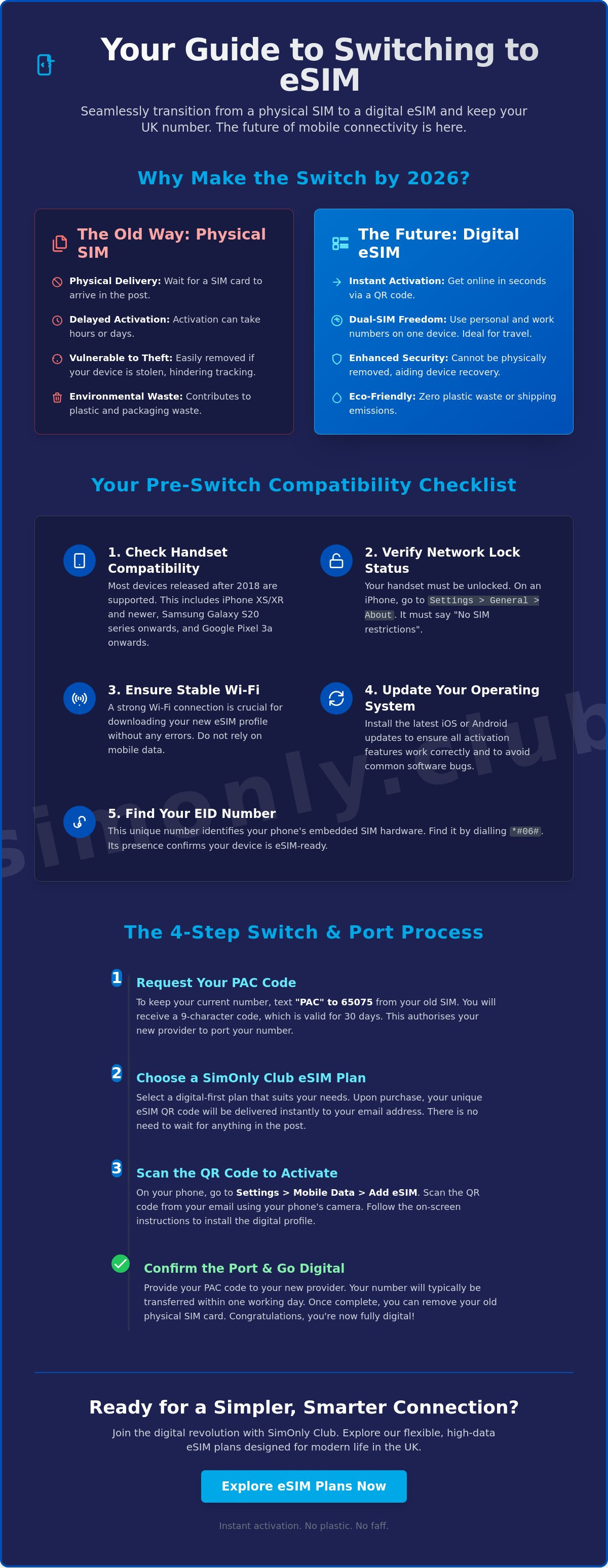
Step-by-Step: Converting Your Physical SIM to Digital
The process of transitioning from a traditional card to a digital profile is remarkably efficient once you have your activation details ready. Most UK providers have streamlined this journey to ensure you aren't left without a signal during the migration. When you are switching to esim from physical sim, the goal is a logical handover where your phone recognises the new digital credentials before you discard the old hardware. This sequence works across both iOS and Android platforms, providing a universal path to modern connectivity.
- Step 1: Request your activation kit. Log into your provider's app or website to generate a unique QR code. If you are using a service like SimOnly Club, this is typically delivered to your email instantly.
- Step 2: Open your mobile settings. On an iPhone, go to Settings > Mobile Service > Add eSIM. For Android users, navigate to Settings > Connections > SIM Manager > Add eSIM.
- Step 3: Scan the QR code. Your phone camera will act as the bridge, pulling the digital profile into your device hardware. If the camera fails to pick it up, you can manually enter the SM-DP+ address and activation code provided in your kit.
- Step 4: Label your plans. You'll be prompted to name your new connection. We recommend labels like "Personal" or "Work" to keep things clear, especially if you plan to add an Unlimited Data eSIM for travel later.
- Step 5: Restart your device. A quick reboot helps the handset register the new network settings and establish a fresh handshake with the local masts.
Only once you see the signal bars appear for your new digital profile should you remove the old physical SIM card. Modern handsets are designed to handle both simultaneously during the setup phase. If you remove the plastic card too early, you might interrupt the verification process required by some UK networks.
Activating via QR Code
This remains the most popular method amongst UK residents and visitors. For a successful scan, ensure you are in a well-lit room and your camera lens is clean. If the code isn't recognised immediately, try increasing the brightness on the screen displaying the QR code. If it still refuses to scan, don't panic. Manual entry is a reliable fallback that ensures your transition remains on track.
In-App Activation Methods
Some providers now offer "One-Tap" activation directly within their mobile apps. This removes the need for a second screen or a printed QR code. It is a faster way of switching to esim from physical sim, but it requires patience. If the signal doesn't appear within two minutes, do not delete the profile. Deleting an eSIM profile often "kills" the activation code, requiring you to request a new one from customer support. Instead, toggle Flight Mode on and off to force a network search.
How to Change Mobile Network and Keep Your Number
Keeping your existing mobile number is often the biggest concern when moving to a new provider. In the UK, you have a legal right to take your number with you, a process known as porting. When you are switching to esim from physical sim, this transition is governed by the Porting Authorisation Code (PAC) system. This ensures that your digital migration doesn't result in a lost identity or missed calls from family and colleagues whilst you upgrade your tech.
A successful switch requires precise timing. You should always activate your new eSIM first using the temporary number provided by your new network. Once you've confirmed that the digital profile is active and data is flowing, you can then initiate the number transfer. Never cancel your old contract manually. If you terminate the service before the port is complete, you risk losing your number forever. When switching to esim from physical sim, the porting process itself acts as the cancellation notice for your previous provider.
The 65075 PAC Request
Obtaining your transfer code is straightforward. Simply text "PAC" to 65075 from your current physical SIM. Your old provider will reply within minutes with a unique nine-digit code. This code is valid for exactly 30 days. The PAC code is the key to a seamless number transfer, allowing your new provider to pull your identity onto the digital chip. If you're looking for more background on the technology behind this, check out The Ultimate Guide to eSIM UK: Everything You Need to Know in 2026.
Finalising the Port to Your eSIM
Once you have your code, provide it to your new eSIM provider through their online portal or app. On "Switching Day", which is typically the next working day, your old physical SIM will eventually lose its signal. This is your cue to switch over to your digital profile. You might experience a short period of "split service" where calls and texts arrive at different times, but this typically resolves within a few hours. For those ready to make the move today, you can browse our Unlimited Data eSIM plans to find a package that fits your lifestyle perfectly.
Mastering Your New Digital Connectivity with SimOnly Club
SimOnly Club is the favourite choice for UK residents looking for unlimited data without the traditional faff. We've built our entire ecosystem around the modern user who values speed and digital-first efficiency. When you're switching to esim from physical sim, you're not just changing a card; you're joining a specialised community of tech-savvy individuals who prioritise convenience. Our activation process is completely hardware-free. Your digital profile arrives in your inbox the moment you complete your order, removing the need for plastic waste and postal delays.
Managing your account in the future is just as straightforward. If you decide to upgrade your handset next year, you can transfer your digital profile between devices through your account settings. This hardware-free approach gives you total control over your connectivity. For those who travel frequently, the dual-SIM capability of modern phones is a significant advantage. You can easily add a Europe eSIM alongside your UK plan to enjoy seamless roaming whilst keeping your primary number active for important calls from home.
Why Choose a Digital-Only Provider?
Operating without high-street shops or physical warehouses allows us to pass significant savings directly to you. Lower overheads mean we can offer higher value on unlimited data plans compared to legacy networks. Our support team is also specialised in digital connectivity. We provide expert guidance on eSIM-specific queries that generalist providers often struggle to answer. This focus ensures you have a reliable partner who values your time and provides straightforward solutions without unnecessary fluff.
Next Steps for Your Switch
You now have the complete roadmap for a successful transition. Before you proceed, run through your final checklist one last time. Is your handset definitely unlocked? Have you received your PAC code from your current provider? Do you have a stable Wi-Fi connection ready for the profile download? If the answer is yes, you are ready to experience the freedom of a digital-first mobile plan. Browse our range of UK resident eSIM plans to find the perfect data package for your needs. Explore SimOnly Club eSIM plans today and master your mobile experience with instant, digital activation.
Step Into the Digital Future of Connectivity
Embracing the digital revolution is about more than just following a trend. It's about securing your device and gaining the freedom to manage multiple lines without the faff of plastic cards. By following this 2026 checklist, you've learned that switching to esim from physical sim is a logical, secure, and instant process. You now know how to verify your handset, navigate the PAC code system, and activate your new profile whilst maintaining a stable Wi-Fi connection.
We pride ourselves on being the modern facilitator for your mobile needs. With our instant digital delivery and unlimited data options for the UK and EU, you're choosing a service designed for the high-speed demands of today. Our expert UK-based digital support is always ready to ensure your transition is as smooth as possible. Don't let traditional, cumbersome methods hold you back from a more efficient mobile lifestyle. You have the tools and the knowledge to make a smart, informed choice.
Switch to a SimOnly Club eSIM and keep your number today. Take control of your connectivity and enjoy the simplicity of a hardware-free future.
Frequently Asked Questions
Can I switch back to a physical SIM after using an eSIM?
Yes, you can switch back to a physical SIM card at any time. You will need to request a replacement physical SIM from your mobile provider, which will deactivate the digital profile once the new plastic card is registered and inserted. This process is essentially the reverse of switching to esim from physical sim and remains a standard procedure for all major UK networks.
How long does it take to switch from a physical SIM to an eSIM?
The technical activation of an eSIM usually takes between a few minutes and a couple of hours. Once you scan your QR code or complete the in-app setup, the digital profile downloads almost instantly to your handset. If you are also porting your mobile number from a different provider, that specific transfer typically completes on the next working day, following standard UK porting timelines.
Will I lose my contacts or photos when I switch to an eSIM?
No, you will not lose any contacts, photos, or apps during the switch. An eSIM only manages your network connection and phone number, not your device's internal storage or cloud backups. It is always a good idea to ensure your contacts are synced to your Apple ID or Google Account, but the activation of a digital profile itself does not touch your personal data.
What happens if I delete my eSIM profile by mistake?
If you delete your profile, your phone will lose its network connection immediately. You cannot simply "undo" this action within your settings. You will usually need to contact your provider or log into your online account from another device to request a new activation QR code. Treat your digital profile like a physical card; don't remove it unless you are certain you want to deactivate the service.
Can I use my physical SIM and an eSIM at the same time?
Yes, most modern handsets allow you to keep a physical SIM and an eSIM active simultaneously. This Dual SIM functionality is perfect for managing a work and personal number on one device or using Visitor eSIM Plans for data whilst keeping your primary UK number active for calls. You can choose which SIM to use for data, calls, and texts within your mobile settings.
Is there a charge for switching to an eSIM in the UK?
Most major UK networks do not charge existing customers to swap from a physical SIM to an eSIM. It is typically treated as a standard, free SIM replacement. If you are switching to a new provider entirely, you will just pay for the new plan you choose, such as an Unlimited Data eSIM, without any specific activation fee for the digital format itself.
How do I transfer my eSIM to a new phone in the future?
Transferring your connection to a new handset typically involves deactivating the profile on your old device and scanning a new QR code on the new one. Some manufacturers offer a "Quick Transfer" feature that moves the eSIM during the initial phone setup. If your provider does not support this, you can simply request a fresh activation kit through your online account portal.
Does switching to an eSIM improve my signal strength?
Switching to esim from physical sim does not directly improve your signal strength. The quality of your connection depends on your provider's mast coverage in your specific area and the hardware capabilities of your handset. However, because an eSIM allows you to easily switch between different networks or use Dual SIM features, you have more flexibility to find the strongest signal available at any given location.