


What if the physical SIM card you've used for years suddenly became a relic of the past? With the arrival of the iPhone 17 Air and its eSIM-only design, the transition to digital connectivity is no longer optional for many mobile users. Learning how to activate esim on iphone uk doesn't need to be a source of stress or technical dread. It's completely natural to worry about your current mobile number vanishing into the digital ether or getting stuck on a loading screen whilst your Wi-Fi connection hangs during the process.
We know that navigating the My O2 app requirements can feel like a maze when you just want those signal bars to appear. This guide is here to remove that complexity and give you the confidence to manage your profile digitally. You'll master the O2 eSIM activation process on your iPhone with our clear, step-by-step 2026 instructions and expert troubleshooting. We'll walk you through the entire download, from scanning your QR code to setting up dual-SIM features for travel, ensuring you're connected and ready to go within minutes.
Key Takeaways
- Confirm your iPhone is unlocked and updated to the latest iOS to ensure a seamless transition to a modern, digital-first mobile experience.
- Learn exactly how to activate esim on iphone uk by following our precise steps for scanning O2 QR codes and using the "Add eSIM" menu.
- Discover how to manage your digital profile effortlessly, including how to retrieve lost QR codes or perform a SIM swap via the My O2 app.
- Resolve common activation errors, such as "Unable to Activate" messages or expired codes, with our expert troubleshooting guide.
- Explore flexible, no-contract eSIM alternatives that provide unlimited data and freedom for both UK residents and international visitors.
Preparing for O2 eSIM Activation: Compatibility and Requirements
An O2 eSIM is a downloadable digital profile that resides on a tiny chip embedded within your device. This eliminates the need for traditional plastic cards, allowing you to manage your mobile plan through software rather than hardware. By utilising eSIM technology, your iPhone can store multiple network identities, making it easier than ever to switch between a personal line and a business number. Understanding how to activate esim on iphone uk starts with a simple hardware check to ensure your device is prepared for this digital-first transition.
Success depends on your network environment. You must have access to a stable Wi-Fi connection before initiating the process. In 2026, the activation handshake requires your iPhone to download and verify the latest security certificates from O2's central servers. If your Wi-Fi is patchy, the activation might stall; this leaves your profile in a "pending" state that's often difficult to clear without technical support. Ensure you're in a location with a strong, consistent signal to avoid these common activation hangs.
Your iPhone also needs to be carrier-unlocked. If you purchased your device directly from Apple, this is usually guaranteed. However, if your handset was provided by another network, you might need to request an unlock before O2's digital profile can be installed. This step is vital because a locked device will simply reject the new credentials during the setup phase.
Checking Your iPhone Compatibility
To verify your hardware is ready, go to Settings > General > About. Scroll down to find the "Network Provider Lock" section. If it displays "No SIM restrictions", you're clear to proceed. Whilst in this menu, locate your EID (Embedded Identity Document) number. This 32-digit code acts as the unique serial number for your internal eSIM chip. For those using the latest 2026 hardware, such as the iPhone 17 Air or the iPhone 16 Pro, your device is designed to support dual-eSIM functionality. This means you can have two digital plans active at the same time, which is perfect for balancing a local UK plan with an international data roaming profile.
The Pre-Activation Checklist
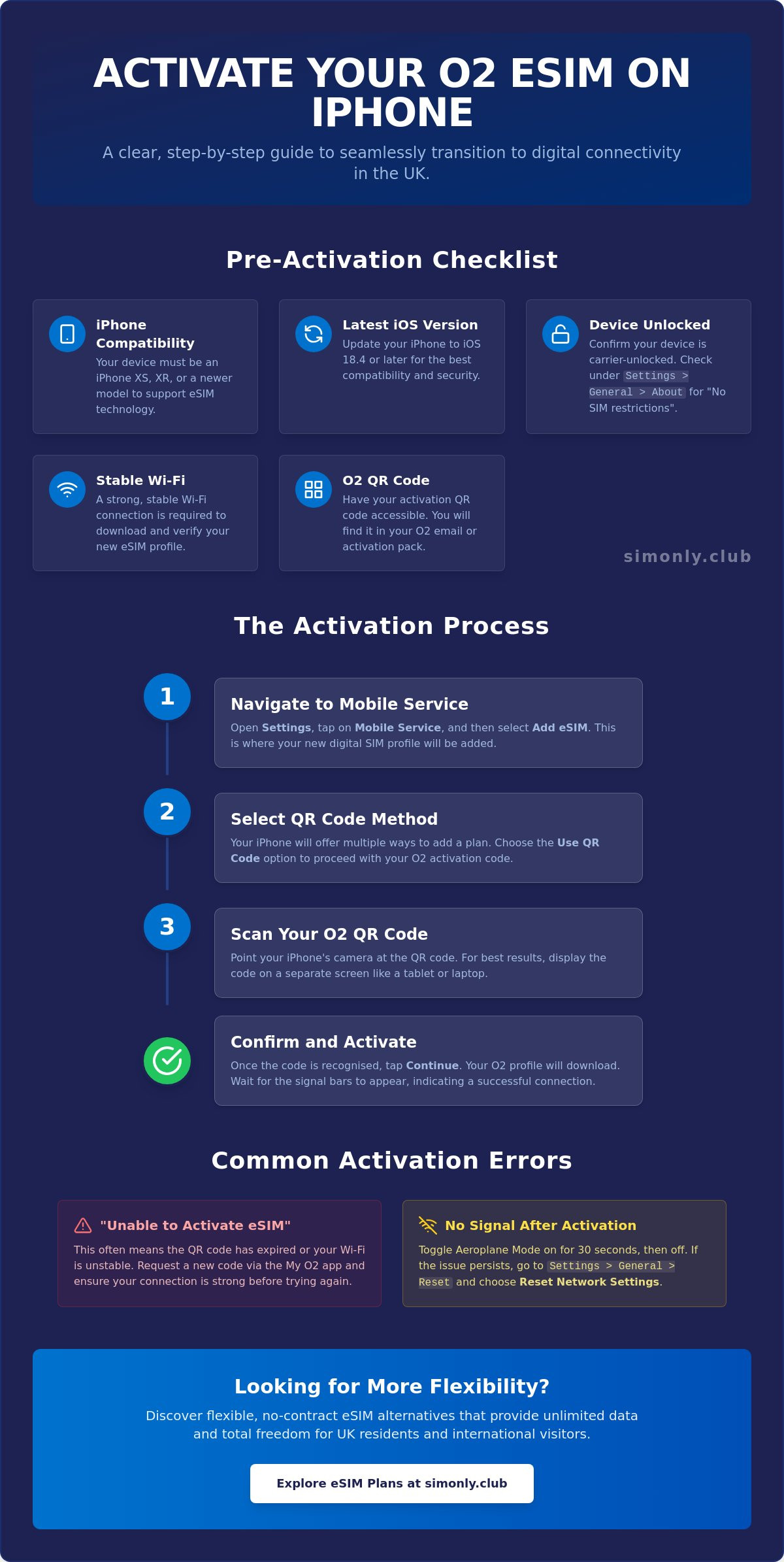
Software is the final piece of the puzzle. You must update your device to the latest iOS version to ensure compatibility with O2's 2026 network protocols. Specifically, iOS 18.4 or later is recommended for a smooth experience. Once your software is ready, ensure you have your O2 activation email or the physical QR pack you received in-store. This QR code is your unique key to the network. You should never share this code or post images of it online, as it contains sensitive data that could allow unauthorised access to your mobile account. Keep it secure until you're ready to scan it during the setup process.
Step-by-Step Guide: How to Activate O2 eSIM on iPhone
Once you've confirmed your hardware is ready, the actual installation is remarkably quick. O2 has streamlined the digital handshake to ensure you aren't tethered to a physical store or waiting for the post. Learning how to activate esim on iphone uk involves navigating the updated iOS 18 menus where "Mobile Data" has been replaced by "Mobile Service" to better reflect our modern, multi-line reality. This process is designed to be hardware-free and can be completed in just a few taps.
The Manual Activation Process
Open your iPhone's Settings and tap on Mobile Service. From here, select Add eSIM. You'll be presented with a choice to transfer from a nearby iPhone or use a QR code; choose Use QR Code. Point your camera at the digital voucher provided in your O2 confirmation email or within the My O2 portal. It's helpful to display the code on a laptop or tablet screen whilst you scan. Once the camera recognises the code, a "Cellular Plan Certified" notification will appear. This confirms that the secure download of your O2 profile has begun. Tap Continue and wait a few moments for the signal bars to appear at the top of your screen.
Organising Dual SIM for UK Residents
The true power of this technology lies in its flexibility. Unlike traditional SIM cards, an eSIM allows you to run multiple plans simultaneously without swapping physical trays. This shift aligns with the UK government's eSIM adoption strategy, which highlights the efficiency and sustainability of moving away from plastic hardware. During the setup, your iPhone will ask you to label your new O2 line. We recommend choosing a clear name like "Primary" or "O2 Work" to avoid confusion. This is particularly useful if you also use no-contract eSIM plans for international travel or extra data capacity.
You'll then need to decide which line handles specific tasks:
- Default Line: This is the number used for outgoing calls and messages to people not currently in your Contacts.
- iMessage & FaceTime: You can select either your O2 number or a secondary line to register with Apple's services.
- Mobile Data: Choose O2 for your daily UK usage, but ensure "Allow Mobile Data Switching" is toggled on if you want your iPhone to automatically use the strongest available connection whilst moving between networks.
By carefully labelling these lines, you ensure that your WhatsApp and iMessage registrations stay consistent, even when you're swapping between different data profiles for work or holiday.
Managing Your O2 Digital Profile: QR Codes and SIM Swaps
Managing a mobile identity in 2026 is a purely digital experience. You no longer need to keep track of a tiny piece of plastic that can be easily lost or damaged. Instead, your O2 profile is stored securely in the cloud, ready to be accessed whenever you change devices or need to reinstall your plan. Understanding how to activate esim on iphone uk also means knowing how to manage these digital credentials through the My O2 interface. This ensures you maintain control over your connectivity without needing to visit a high street shop.
Using the My O2 App for Instant Installation
The most efficient way to handle your profile is through the My O2 app. This method bypasses the need for a physical QR code altogether. By selecting the "Install SIM" feature, the app communicates directly with your iPhone's internal hardware to configure the profile automatically. For 2026, O2 has enhanced its security protocols, so expect a robust two-factor authentication process. You'll likely receive a secure code via SMS or email to verify your identity before the download begins. This digital-first approach is becoming the standard, as highlighted in this MoneySavingExpert guide to eSIMs, which details how major UK networks are moving towards hardware-free solutions.
Swapping from Physical SIM to eSIM
Many residents are choosing to learn how do esims work to gain better flexibility with their mobile plans. If you're currently using a traditional plastic SIM, the swap to an eSIM is straightforward but requires a small amount of patience. Once you initiate the swap in the My O2 app, there is typically a 24-hour window whilst the network updates your records. Your physical SIM will remain active until the eSIM profile is fully provisioned. It's vital to ensure your contacts and messages are backed up to iCloud before you start, as this transition focuses on the network connection rather than local data storage.
If you're upgrading to a new iPhone, the process is even simpler. Apple's "eSIM Quick Transfer" allows you to move your O2 profile from your old device to the new one during the initial setup, provided both handsets are running the latest iOS. Only delete an eSIM profile if you're certain you no longer need it or are preparing to sell the device. Deleting a profile doesn't cancel your contract; it simply removes the digital key from your phone, which may require a new QR code from O2 to restore.
Troubleshooting O2 eSIM: Fixing Common Activation Errors
Even the most streamlined digital transitions can occasionally hit a snag. If you've been following the steps on how to activate esim on iphone uk and hit a wall, don't worry; most issues are software-based rather than hardware faults. One of the most common frustrations on newer iOS versions is the "Unable to Complete Data Plan Change" error. This usually indicates that the iPhone lost its secure connection to O2's activation server during the handshake process. If this happens, your first step should be to check Settings > Mobile Service to see if the profile is listed but simply hasn't switched on yet.
Another frequent issue involves the QR code being reported as "No Longer Valid" or "Expired". This often occurs if you've previously attempted the scan or if the network has already provisioned the line to your EID. Similarly, if you see "No Service" after a successful-looking setup, your profile might be stuck in a provisioning queue. On the O2 5G network, "PDP Authentication" failures can also crop up; this is a technical way of saying your phone cannot verify its data credentials with the tower. Often, toggling Airplane Mode on and off for ten seconds will force a fresh authentication.
Network and Software Conflicts
Your network environment plays a massive role in a successful download. If you use a VPN, you must disable it before scanning your QR code. VPNs can mask your location or encrypt traffic in a way that blocks O2's security certificates from installing correctly. If the activation remains "hanging", a simple restart of your iPhone often clears the temporary cache causing the delay. For more stubborn errors, you can go to Settings > General > Transfer or Reset iPhone > Reset > Reset Network Settings. This won't delete your photos or apps, but it will refresh your connection protocols and clear out saved Wi-Fi passwords.
When to Contact O2 Support
If you've tried the DIY fixes and still have no signal bars, it's time to speak with a professional. You should be able to distinguish between a hardware fault and a network delay; if your EID is visible in your settings, your internal chip is likely fine. Have your order number, EID, and IMEI ready before calling or using the My O2 chat. If your original QR code was accidentally damaged or deleted, O2 can usually issue a replacement digital voucher to your registered email. For those seeking a backup or a more flexible alternative, exploring UK Resident eSIM plans can provide a secondary data line in seconds.
Beyond O2: Exploring Flexible eSIM Alternatives in the UK
Whilst O2 provides a robust and reliable network, the activation journey can sometimes feel tethered to traditional banking checks and physical store visits. Modern mobile users are increasingly turning to digital-first providers that prioritise speed and hardware-free convenience. If you've already learned how to activate esim on iphone uk through a major carrier, you might be surprised by how much simpler the process becomes with a specialised provider. This shift is about more than just technology; it's about reclaiming your time and ensuring your mobile plan fits your lifestyle rather than the other way around.
Traditional carriers often require you to navigate complex portals or wait for activation windows that can last up to 24 hours. In contrast, digital-first providers focus on instant delivery. This means your digital profile is ready the moment you complete your purchase, bypassing the bureaucratic hurdles that often slow down the transition. For those who value privacy and efficiency, this modern approach offers a refreshing alternative to the standard contract model.
The Rise of Digital-First Connectivity
Many residents now prefer to avoid the long-term commitments and credit checks associated with traditional mobile contracts. Providers like SimOnly Club remove these barriers, offering a streamlined experience where you can receive an unlimited data esim uk instantly via email. This bypasses the need for the My O2 app entirely. When you compare the setup speed, a digital-first profile is often ready to use in seconds rather than minutes. If you are still wondering how to activate esim on iphone uk without the wait, the answer lies in these one-click setups that prioritise your immediate connectivity needs.
Finding the Right Plan for Your Lifestyle
Choosing the correct plan depends on your specific data consumption and travel habits. Whether you're a casual browser or someone who requires high-bandwidth streaming for work, there's a digital solution available. For those who value total freedom, the no contract esim uk model provides the ultimate flexibility. It allows you to pause or change your service without penalty, which is a significant advantage over fixed-term agreements.
Residents planning trips abroad also benefit from specialised profiles that prevent bill shock. For example, using the best esim for usa travel ensures you stay connected with local rates whilst you're away, all whilst keeping your primary O2 line active for calls and texts. Ultimately, the transition to digital connectivity is about empowerment. By choosing a provider that matches your digital-first lifestyle, you ensure that your connectivity remains as mobile and flexible as you are.
Embrace the Future of Digital Connectivity
You've now seen that moving to a digital-first mobile plan is about more than just avoiding plastic; it's about gaining the freedom to manage your connectivity on your own terms. From verifying your iPhone's "No SIM restrictions" status to navigating the updated Mobile Service menus, you're equipped with the knowledge to stay connected without the stress. Mastering how to activate esim on iphone uk ensures you can switch between personal and business lines or add international data profiles with total confidence, even on the latest 2026 hardware.
For those who want to skip the queues and bureaucratic hurdles of traditional carriers, discover the easiest way to get an eSIM UK with SimOnly Club. You'll benefit from instant digital delivery in seconds and a range of unlimited data options for residents and visitors alike. With no credit checks or long-term contracts required, it's the most straightforward way to embrace the next generation of mobile technology whilst keeping your data usage flexible and affordable. Your iPhone is ready for the digital age, and now you are too. Welcome to a world of effortless, hardware-free connectivity.
Frequently Asked Questions
How long does it take for an O2 eSIM to activate on iPhone?
Activation typically happens within minutes, although it can take up to 24 hours if you're performing a SIM swap from a physical card. Once you've scanned the QR code and the "Cellular Plan Certified" message appears, your signal bars should show up shortly. If you're wondering how to activate esim on iphone uk quickly, ensure you're on a stable Wi-Fi connection to prevent the process from hanging during the handshake.
Can I use my O2 eSIM on two different iPhones at the same time?
No, an eSIM profile is unique to a single device and cannot be active on two handsets simultaneously. If you want to move your plan, you must use Apple's eSIM Quick Transfer or delete the profile from your old phone before reinstalling it on the new one. This security measure prevents unauthorised duplication of your mobile number and ensures your digital identity remains protected within O2's secure network.
What happens if I accidentally delete my O2 eSIM profile?
Deleting the profile removes the digital key from your handset, but it doesn't cancel your O2 contract. You'll lose your signal immediately and will need to visit the My O2 app or contact support to receive a replacement QR code. It's best to avoid deleting the profile unless you're troubleshooting a major error or preparing to sell your device to someone else, as it requires a fresh setup to restore service.
Do I need a new PAC code to switch to an O2 eSIM?
You don't need a PAC code if you're already an O2 customer moving from a physical SIM to a digital profile. PAC codes are only required when you're moving your mobile number from one network provider to another. For an internal SIM swap, you simply request an eSIM through your account settings; this keeps your existing UK mobile number and contract terms exactly the same without any porting delays.
Will my O2 eSIM work for roaming in the EU and USA in 2026?
Yes, your digital profile functions exactly like a physical SIM card whilst travelling abroad. In 2026, O2 continues to offer inclusive roaming in its Europe Zone, subject to a 25GB data cap, and provides travel bolt-ons for destinations like the USA. If you require more data whilst away, you might also consider adding a secondary travel-specific profile from SimOnly Club alongside your primary O2 line for better value.
Can I have both a physical SIM and an O2 eSIM on one iPhone?
Yes, most modern iPhones allow you to use a physical SIM and an eSIM at the same time for dual-SIM functionality. This is a perfect solution if you want to keep a work number and a personal number on a single device without carrying two handsets. You can easily manage which line handles calls, messages, and mobile data through the "Mobile Service" section in your iOS settings for total convenience.
Why is my O2 eSIM QR code not working on my new iPhone?
If you're struggling with how to activate esim on iphone uk on a replacement handset, remember that O2 QR codes are typically for single-use only. If you've already scanned it on an old phone, it won't work on a new one. Another common reason is that your new iPhone might still be locked to a previous network, which prevents it from accepting a digital profile from a different provider until it's unlocked.
Is there a cost to swap from a physical O2 SIM to an eSIM?
O2 does not charge any extra fees for swapping your physical SIM card for a digital eSIM profile. It's a free service available to all pay monthly and Pay As You Go customers. Because the process is digital, you also save on the time and potential costs associated with visiting a physical store or waiting for a new plastic card to arrive in the post, making it a highly efficient upgrade.