


Carrying two mobile phones in 2026 is an unnecessary burden that belongs in the past. If you're tired of juggling a work handset and a personal device, or if you're worried about high roaming charges whilst using your primary UK SIM abroad, there's a much smarter way to stay connected. Learning how to use esim and physical sim together allows you to transform your current smartphone into a dual-line powerhouse without the extra weight.
You likely want to keep your long-standing phone number for calls whilst enjoying the freedom of modern, digital-only data plans. We understand that nobody wants to miss an important call just to save a few pounds on data. This guide promises to show you exactly how to manage two numbers on a single device, slash your costs, and enjoy seamless connectivity. We'll look at the latest Dual SIM Dual Standby (DSDS) technology and the simple steps needed to activate a second line instantly.
Key Takeaways
- Learn how modern DSDS technology allows your handset to manage two lines efficiently without draining your battery.
- Master how to use esim and physical sim together to keep your trusted UK number whilst instantly adding a secondary line for work or travel.
- Discover the "bridge" strategy to access unlimited data plans without losing your existing physical SIM contacts or legacy services.
- Follow a simple, hardware-free setup guide to activate your second line via a digital QR code in just a few minutes.
- Transition to a single-device lifestyle that separates work and personal life without the burden of carrying two separate phones.
What is Dual SIM and How Does it Work with eSIM?
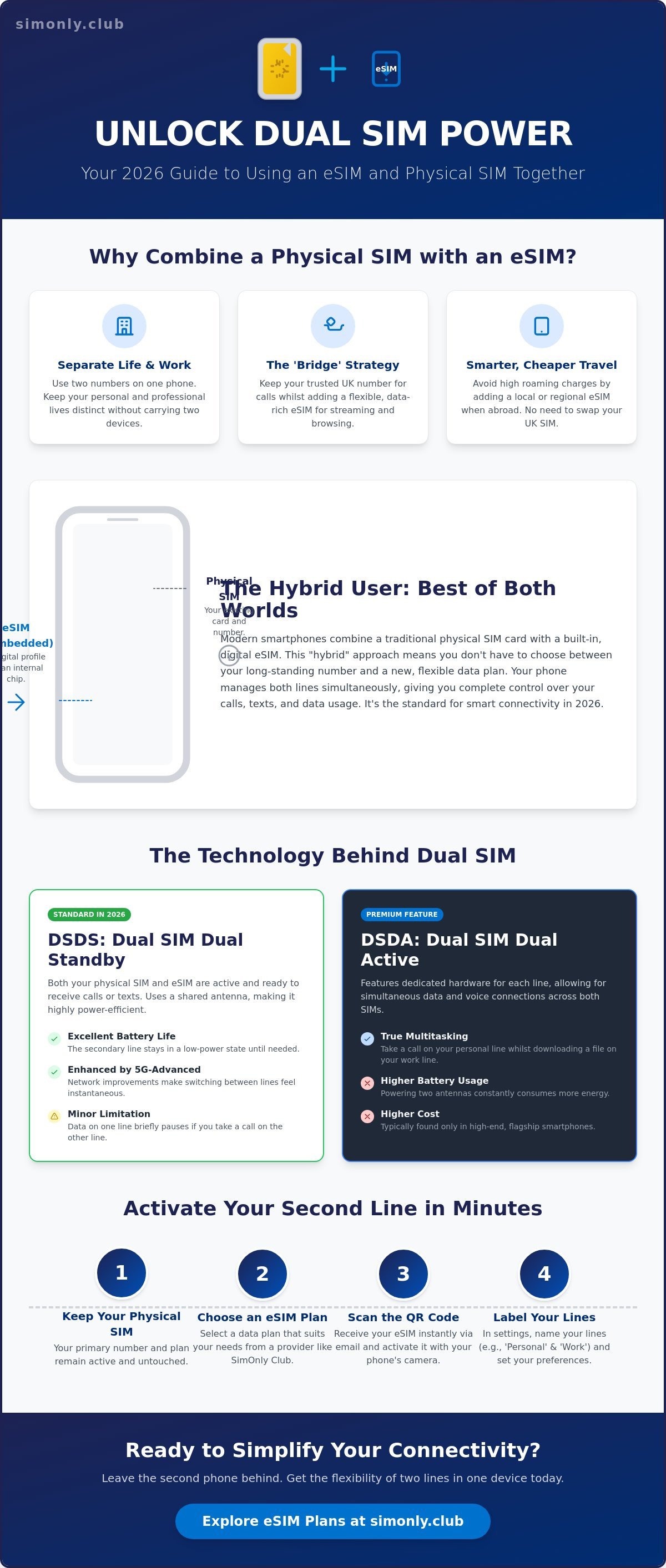
Dual SIM technology allows you to have two active mobile plans on a single handset simultaneously. In the past, this usually meant carrying a bulky phone with two physical card trays. However, the landscape in 2026 has shifted towards a more elegant, software-driven solution. Learning how to use esim and physical sim together is now the standard way to manage multiple lines without needing a second device. The magic happens through an internal chip that replaces the need for a second physical slot, allowing your phone to communicate with two different networks at once.
This setup has created the "Hybrid User." These are people who want to balance the reliability of their older, established contracts with the modern freedom of digital-only plans. By using a physical SIM alongside an eSIM, you aren't forced to choose between your decade-old phone number and a great data deal. You can have both. It's a practical way to separate your work life from your personal life whilst enjoying the best network coverage available in your area. This approach removes the stress of missing calls on your primary line just because you wanted a cheaper data rate elsewhere.
The Evolution from Dual Physical Slots to eSIM
The UK mobile market transitioned towards the eSIM hybrid model because it offers significant hardware advantages. Manufacturers prefer eSIM technology because removing the physical SIM tray creates more internal space. This space is often used to house larger batteries or to improve the device's water and dust resistance. We define Dual SIM with eSIM as the simultaneous operation of a physical nano-SIM and a digital profile. This digital profile is downloaded instantly, removing the need to wait for the post or find a paperclip to open a tray.
Common Use Cases for UK Residents
Why would you want to run two lines? For most people, it comes down to convenience and cost. Here are the most common ways people are using this technology today:
- Work and Personal Separation: You can receive calls for your business line and your personal number on the same device, keeping your evenings free from work distractions without carrying two handsets.
- Data Optimisation: Many users keep their physical SIM for traditional calls but add a no contract eSIM UK for data-heavy tasks like streaming or gaming to avoid restrictive caps on their main plan.
- Temporary Connectivity: If you're heading abroad or need a secondary line for a short-term project, you can set up a temporary line without ever removing your primary UK SIM card.
This hybrid approach ensures you are never tied down to a single provider's limitations. It puts the control back into your hands, allowing you to switch data providers or add lines in seconds. By understanding how to use esim and physical sim together, you ensure your connectivity is as flexible as your lifestyle requires.
The Technical Side: DSDS vs DSDA in 2026
Most modern smartphones in 2026 rely on Dual SIM Dual Standby (DSDS) technology. This system allows both your physical SIM and your eSIM to remain active for calls and texts at the same time. However, because most handsets use a shared antenna system to preserve battery life, only one line can be used for a data session at any given millisecond. If you are learning how to use esim and physical sim together, understanding this distinction is vital. It ensures you aren't surprised when your data pauses briefly during an incoming call on your secondary line.
High-end flagship devices often feature Dual SIM Dual Active (DSDA). This more advanced hardware setup includes dedicated antennas for each line, allowing you to take a call on one number whilst simultaneously using 5G data on the other. While DSDA offers the ultimate in connectivity, it remains a premium feature due to higher manufacturing costs and increased battery consumption. Fortunately, the arrival of 5G-Advanced (also known as 5.5G) has significantly narrowed the gap. This new network standard reduces the latency experienced when your phone switches between lines, making the transition feel instantaneous even on standard DSDS devices.
Battery efficiency has also seen a massive boost. In previous years, running two lines was a notorious drain on power. In 2026, intelligent software management ensures that your phone only draws significant power from the line currently in use. Your device keeps the secondary line in a low-power "sleep" state until a signal is detected. This means you can enjoy the flexibility of two numbers without constantly reaching for your charger. If you're looking for an efficient way to manage your connectivity, choosing a UK resident eSIM is a smart move for any modern professional.
How Your Phone Handles Incoming Calls
When a call arrives on Line B whilst you are browsing on Line A, your phone prioritises the voice connection. On most UK networks, "Wi-Fi Calling" plays a clever role here. If you have a weak signal on your primary line, your phone can actually use the data connection from your second SIM to "tunnel" the call through. This ensures you never miss a message or call, even in the depths of a concrete office building. You can easily manage these priorities within your device settings, ensuring your work notifications don't interrupt your personal time.
Data Switching and Default Lines
To avoid unexpected charges, you must designate a "Default Data" line in your settings. This tells your phone exactly which plan to use for your apps, maps, and streaming. You'll also find a feature called "Allow Mobile Data Switching." Turning this on allows your phone to automatically jump to the other SIM if the primary one loses signal. It's a lifesaver for commuters, but keep it off if your secondary line has a limited data cap. For those using an iPhone, Setting up Dual SIM on iPhone provides a clear path through these specific menu options. Mastering these toggles is the final step in truly understanding how to use esim and physical sim together effectively.
Why Combine a Physical SIM with a SimOnly Club eSIM?
Keeping a physical SIM often comes down to sentiment and security. If you've held the same mobile number for over a decade, it's likely linked to your banking apps, healthcare records, and two-factor authentication. Porting that number can feel like a risk you'd rather avoid. By choosing to combine your existing card with a digital plan, you retain that legacy connection whilst modernising your device's capabilities. It's the ultimate "safety first" approach for UK residents who value stability but crave modern performance.
The real power lies in the "Hybrid Switching" strategy. You can keep your physical SIM for those essential calls and texts, then add a cheapest unlimited data esim uk to handle the heavy lifting. This allows you to bypass the restrictive data caps and mid-contract price hikes often found in traditional long-term agreements. Learning how to use esim and physical sim together means you never have to compromise on speed or volume just to keep your trusted old number.
Redundancy is another massive benefit. Relying on a single network provider is a gamble, especially if you live in a rural area or commute through "dead zones." By using two different UK networks simultaneously, you effectively double your chances of having a signal. If the network on your physical SIM fails, your phone can seamlessly switch to your data line. This level of reliability was once reserved for high-end business users, but it's now accessible to everyone in under five minutes through SimOnly Club's instant digital delivery.
The Cost-Effective Connectivity Strategy
Splitting your services is often far cheaper than a single "all-in-one" contract. You can maintain a low-cost physical SIM for basic minutes and use a high-value eSIM for your primary data needs. This is particularly useful for frequent travellers. You can keep your UK physical SIM active for emergency calls whilst using a Europe eSIM for unlimited data whilst roaming. This prevents "out-of-bundle" charges that can quickly spiral into hundreds of pounds if you rely on your primary provider's standard roaming rates.
Flexibility Without the Plastic
Choosing a digital-first secondary line is an environmentally conscious choice. It eliminates the need for plastic SIM cards and the carbon footprint of physical delivery. If you are curious about how do esims work, the process is entirely software-based. You can upgrade your plan or change providers instantly through your settings menu. For those using compatible hardware, Apple's official guide highlights how simple it is to manage these digital profiles amongst your other mobile settings. This allows you to swap between different data profiles without ever needing a SIM tool.
Step-by-Step: Setting Up Your Hybrid Connectivity
Configuring your device for dual connectivity is a swift, digital-first process that removes the need for physical tools or retail visits. Learning how to use esim and physical sim together starts with a few simple menu adjustments. Before you begin, ensure your handset is "unlocked" from any specific UK carrier. While many modern devices are sold unlocked by default, those on legacy finance plans might require a quick request to the provider to open the eSIM port. Once confirmed, the transition to a hybrid setup takes less time than making a cup of tea.
- Step 1: Verify device compatibility in your settings menu. Most flagship phones from 2024 onwards support this feature.
- Step 2: Purchase your chosen plan from SimOnly Club. You will receive a digital QR code via email almost instantly.
- Step 3: Open your phone’s SIM manager. On most devices, this is found under "Network" or "Mobile Service" settings.
- Step 4: Label your lines clearly. We recommend using names like "Personal" for your physical SIM and "Unlimited Data" for your eSIM to prevent any confusion.
- Step 5: Select your default lines. You can choose which number handles outgoing calls and which one manages your 5G data.
If you're ready to upgrade your mobile experience, you can get started with a SimOnly Club eSIM and activate your second line in minutes.
Configuration for iPhone Users (iOS 19+)
On the latest versions of iOS, navigate to Settings and then "Mobile Service." Tap "Add eSIM" and use your camera to scan the QR code provided. One of the most powerful features here is the ability to assign specific contacts to a preferred line. This ensures that when you call your boss, your phone automatically uses your work number; your family will always see your personal ID. You can also quickly toggle between data lines in the Control Centre by long-pressing the signal bars.
Configuration for Android Users (Android 16+)
Android 16 offers a streamlined "SIMs" menu within the Network & Internet settings. After scanning your QR code, you can enable "Auto-data switching." This allows your phone to jump between your physical SIM and eSIM based on which network has the strongest signal in your current location. For those managing work and personal lives on one device, Android also allows for dual instances of apps like WhatsApp. This means you can run two separate accounts simultaneously, each tied to a different number on your hybrid device. This level of organisation is exactly how to use esim and physical sim together for maximum productivity; for instance, salon owners looking to streamline their operations can discover SalonIQ for professional marketing guidance.
Mastering Your Dual SIM Experience with SimOnly Club
SimOnly Club has established itself as the premier destination for users seeking the best esim uk plans. We believe that mobile connectivity should be effortless and adaptable to your specific needs. When you understand how to use esim and physical sim together, you gain the freedom to choose your data provider independently of your handset manufacturer. This digital-first approach means you are no longer tied to expensive hardware finance bundles just to get the unlimited data you require. You can track your usage and manage multiple profiles directly through your device's native settings, ensuring you remain in total command of your monthly spend.
The industry is rapidly moving toward a hardware-free future. We've already seen manufacturers remove physical SIM trays in other markets, and the UK is likely to follow this trend in coming years. Transitioning to a digital setup today prepares you for the next generation of smartphones whilst allowing you to enjoy the benefits of hybrid connectivity right now. It's a savvy, forward-thinking choice that simplifies your digital life without sacrificing the reliability of your existing physical SIM number.
Troubleshooting Common Dual SIM Issues
Even with the most advanced technology, you might occasionally encounter a minor hurdle. If one of your lines shows "No Service" whilst the other remains active, your first step should be to check the SIM manager in your settings. Ensure the line hasn't been accidentally toggled off. Occasionally, APN (Access Point Name) settings may need a manual refresh to ensure your new data line communicates perfectly with the network. If you ever feel the need for a digital detox, you can temporarily disable your business line for an "unplugged" weekend without deleting the profile or losing any data. This level of control is exactly how to use esim and physical sim together for a better work-life balance.
Ready to Upgrade Your Connectivity?
The hybrid SIM strategy offers a unique combination of value, flexibility, and redundancy. You get to keep your trusted number, access the most competitive data rates, and ensure you have a backup network whenever you travel or commute. It's time to leave the burden of two handsets behind and embrace a more streamlined way of staying connected. Join the digital revolution today and experience the seamless performance of a professional dual-line setup.
We invite you to explore the latest unlimited data deals on the SimOnly Club homepage to find the perfect plan for your hybrid lifestyle.
Embrace the Future of Hybrid Connectivity
Modern mobile technology no longer requires you to choose between your legacy phone number and a high-value data plan. Learning how to use esim and physical sim together is the ultimate solution for UK residents who want to consolidate their work and personal lives into one efficient device. By utilising the power of DSDS, you gain network redundancy and the freedom to switch data providers without ever needing a SIM tool.
Trusted by thousands of UK residents, our service provides unlimited UK data with no speed caps and instant digital delivery in under five minutes. There is no need to wait for the post or deal with cumbersome plastic cards anymore. Upgrade to a SimOnly Club eSIM and keep your physical SIM today. You are just moments away from a more flexible, hardware-free lifestyle that puts you back in charge of your connectivity.
Frequently Asked Questions
Can I use an eSIM and a physical SIM from different networks?
Yes, you can absolutely use different networks for each line. This is the primary reason many people learn how to use esim and physical sim together; it allows you to combine the reliable call coverage of one provider with the superior unlimited data rates of another. As long as your handset is unlocked from its original carrier, you can mix and match any UK or international networks to suit your specific needs.
Will using two SIMs at once drain my phone battery faster?
There is a very marginal increase in power consumption because your phone maintains two separate network connections simultaneously. However, in 2026, modern hardware and software are highly optimised for Dual SIM usage. Your device intelligently manages power by putting the secondary line into a low-power state when it is not actively transmitting data, meaning most users won't notice a significant difference in their daily battery life.
Can I use WhatsApp with two different numbers on one phone?
Yes, you can run two separate WhatsApp accounts on a single device quite easily. Android users can utilise built-in features like "Dual Messenger" or "Parallel Apps" to clone the application. For iPhone users, the most effective method is to download the standard WhatsApp app for your personal number and the WhatsApp Business app for your second line, allowing both to operate independently with their own contact lists.
Does it cost extra to use the Dual SIM feature on my handset?
No, there is no additional fee from your phone manufacturer or network provider to enable the Dual SIM feature. It is a built-in hardware capability of your smartphone. Your only costs are the standard monthly or prepaid charges for the two separate mobile plans you choose to run. This makes it an incredibly cost-effective way to manage work and personal lines without the expense of a second handset.
Can I choose which SIM uses data and which SIM makes calls?
Yes, your phone's settings menu gives you total control over how each individual line is utilised. You can designate one SIM as the "Default Data" line whilst setting the other as the primary choice for outgoing voice calls and messages. Mastering how to use esim and physical sim together involves using these toggles to ensure you are always using the most appropriate and cheapest plan for every task.
What happens to my physical SIM if I delete my eSIM profile?
Nothing happens to your physical SIM if you choose to delete or deactivate your eSIM profile. The two lines operate entirely independently of each other. Deleting an eSIM is simply a software action that removes the digital profile from your phone's internal chip. Your physical nano-SIM will continue to function as the sole active line exactly as it did before you added the digital plan.
Is my phone compatible with using both a physical SIM and an eSIM?
Compatibility depends on your specific model, but most flagship devices released since 2019 support this hybrid setup. This includes the iPhone XS and all newer models, the Samsung Galaxy S20 series onwards, and Google Pixel 4 and later handsets. You can quickly verify this by checking your settings menu under "Mobile Data" or "SIM Management" to see if the option to "Add eSIM" is present.
Can I receive SMS messages on both numbers at the same time?
Yes, both numbers remain active to receive incoming SMS messages and calls simultaneously. When a text arrives, your phone will usually display a small label or icon indicating which SIM received the message. This ensures you never miss a personal text or a work-related notification, regardless of which line you have currently selected for your primary mobile data connection.