


Why are you still waiting in a high street queue for a tiny piece of plastic that belongs in the last decade? If you are ready to declutter your device and embrace a more modern way of staying connected, the decision to switch from o2 to esim is the smartest move you will make this year. It is perfectly natural to feel a bit of activation anxiety regarding QR codes or the fear of being disconnected whilst your number moves across. You want the flexibility of dual SIM for travel or work without the hardware faff, and you want it to work the first time.
We agree that mobile technology should be liberating, not a source of technical frustration. This guide is designed to remove the stress from your digital transition by showing you exactly how to migrate your service without losing a second of connectivity. You will discover the seamless way to transition your O2 service to an eSIM or upgrade to a more flexible digital-first provider whilst keeping your existing mobile number. We will walk through the app-based activation steps, hardware compatibility for 2026, and how to ensure your digital profile is active in minutes.
Key Takeaways
- Understand how a digital profile replaces your physical card, freeing up your handset's SIM slot for international travel or a dedicated work line.
- Follow our simple steps to switch from o2 to esim using the My O2 portal to ensure your service remains active throughout the swap.
- Learn how to resolve common activation issues, such as temporary signal loss or QR code errors, before they disrupt your day.
- Discover the seamless way to keep your current mobile number whilst moving to a more flexible, digital-first provider.
- Compare traditional network constraints with the freedom of instant-delivery eSIM plans that offer unlimited data without the usual high street faff.
Understanding the Move: Why Switch from O2 to eSIM?
The mobile industry has moved at a blistering pace over the last decade. By 2026, the physical SIM card feels like a relic of a bygone era. It's a small, fiddly piece of plastic that takes up valuable space inside your phone's chassis. When you decide to What is an eSIM?, you are essentially downloading a digital profile onto a tiny chip that is already soldered into your device. This isn't just about following a trend; it's about reclaiming your hardware and simplifying how you connect to the world.
One of the most compelling reasons to switch from o2 to esim is the immediate boost to your device's security. If your phone is ever stolen, a thief can easily pop out a physical SIM to prevent you from tracking the device or to use your data allowance. An eSIM is unremovable. It stays tied to the hardware, making it much harder for someone to disconnect your phone from the network without your passcode. This digital-first approach ensures your identity remains protected even if your physical handset isn't in your hands.
Moving to an eSIM is also a vote for environmental efficiency. Millions of plastic SIM cards end up in landfills every year, accompanied by non-recyclable plastic holders and paper envelopes. Moving to a digital profile removes the need for plastic, packaging, and the carbon footprint of postal delivery. In 2026, staying with physical cards is increasingly seen as a legacy choice for those who haven't yet discovered the freedom of a hardware-free connection.
The Benefits of Dual SIM Functionality
Having an eSIM active means your physical SIM tray is now empty. This is a game changer for anyone who balances a work and personal life on one device. You can keep your primary O2 number on the eSIM whilst using the physical slot for a temporary local SIM when you travel abroad. Alternatively, you can run two numbers simultaneously on a single iPhone or Samsung handset. It allows you to toggle data between lines in seconds, ensuring you never miss a client call while browsing on your personal allowance.
Is Your Device Compatible?
Most modern smartphones released in the last few years are ready for this transition. If you are using an iPhone 11 or newer, or a Samsung Galaxy S20 and above, you likely have the necessary hardware. Google Pixel users have enjoyed this since the Pixel 3. To verify this yourself, head to your device settings and look for "Mobile Data" or "SIM Manager". If you see an option to "Add eSIM" or "Download a SIM", your phone is ready. For a more detailed breakdown of specific models, you can read Is Your Phone eSIM Compatible? Here is How to Check.
Choosing to switch from o2 to esim is the first step toward a more flexible mobile experience. It removes the physical barriers of traditional networking and prepares your device for a future where connectivity is instant and entirely digital.
Step-by-Step: How to Request and Activate Your O2 eSIM Profile
Ready to make the jump? The process to switch from o2 to esim is designed to be completed from the comfort of your sofa. O2 has digitised the entire journey, meaning you can bypass the high street queues and manage the transition through your existing account. However, timing is everything. You should set aside about fifteen minutes when you don't need to make urgent calls, as there is often a short "service gap" where your old SIM stops working before the new profile is fully active.
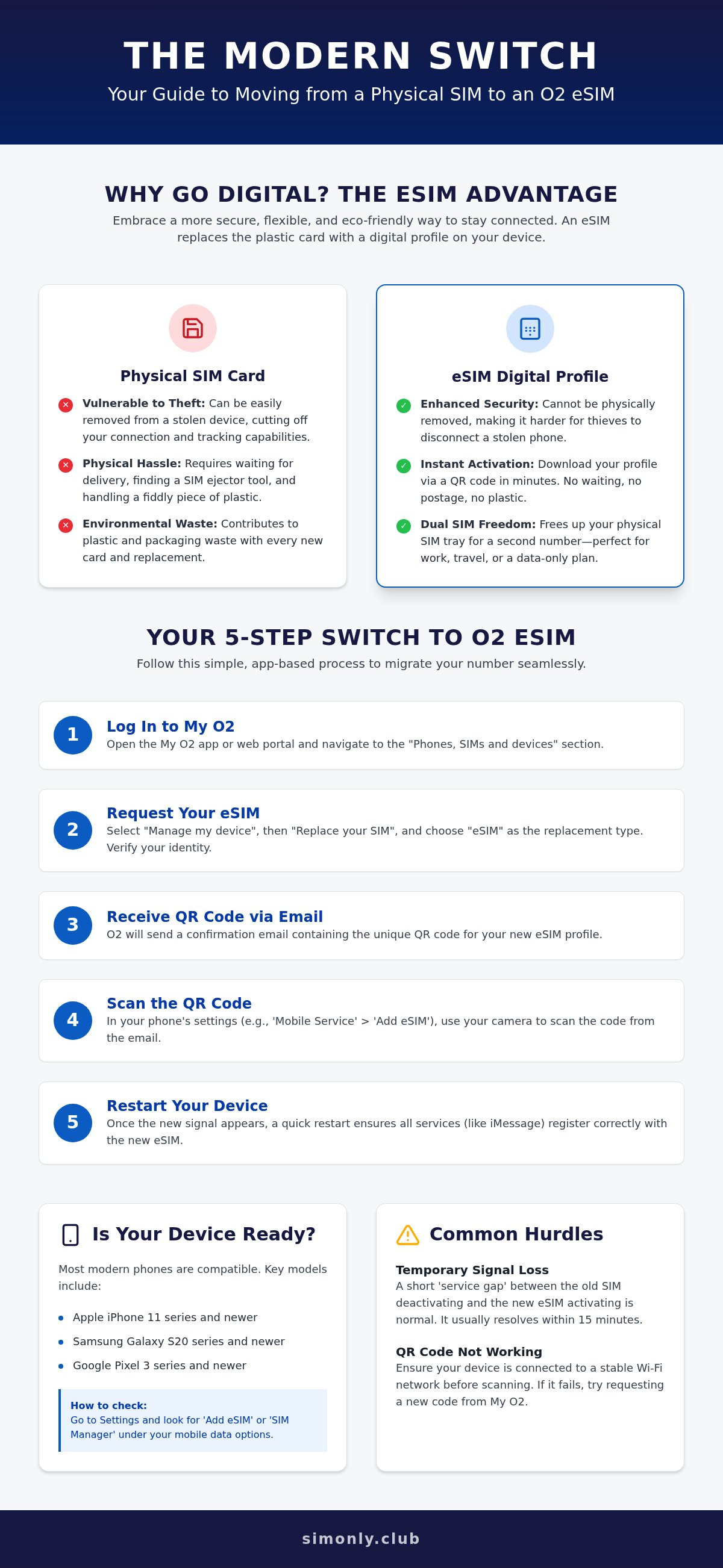
Follow these five steps for a successful migration:
- Step 1: Log in to the My O2 app or the web portal. Navigate to the "Phones, SIMs and devices" section.
- Step 2: Select "Manage my device" and then "Replace your SIM". Choose "eSIM" as your replacement type. You will need to verify your identity, usually via a text code sent to your current number.
- Step 3: Keep an eye on your inbox. O2 will send a confirmation email containing your unique QR code. This is your digital key to the network.
- Step 4: Open your phone's settings. On an iPhone, go to "Mobile Service" and "Add eSIM". On Android, look for "SIM Manager". Choose the option to scan a QR code and point your camera at the one provided by O2.
- Step 5: Once the "O2-UK" signal bars appear, restart your device. This refreshes the network handshake and ensures all services, including iMessage or RCS, register correctly.
Requesting an eSIM via My O2
The My O2 app is the most efficient way to handle the request. Once inside, look for the "SIM and Number" sub-menu. If you find the "Install SIM" button is greyed out, don't panic. This usually happens if you have a pending change on your account or if you are on a legacy Pay As You Go plan that doesn't yet support digital profiles. Always ensure you are connected to a stable Wi-Fi network whilst doing this. If your physical SIM deactivates and you aren't on Wi-Fi, you won't be able to download the new profile.
Manual Activation for Technical Users
If your camera refuses to scan the QR code, you can enter the details manually. You will need the SM-DP+ Address and an Activation Code, both of which are found in your O2 confirmation documents. These technical protocols are part of the global standard, and GSMA's official eSIM information provides more detail on how these secure handshakes work. If you prefer a more streamlined, instant delivery without the carrier-specific app hurdles, you might find digital-first eSIM plans a more refreshing alternative.
By following these steps, you ensure that your transition is as smooth as possible. It's about taking control of your connectivity without the need for physical hardware, allowing you to enjoy the benefits of a truly digital mobile experience.
Troubleshooting Common O2 eSIM Activation Hurdles
Even with a clear plan, the path to a digital connection can occasionally hit a snag. One of the most common issues when you switch from o2 to esim is the dreaded "No Service" glitch. This occurs because the network deactivates your physical SIM the moment the swap is initiated. If your eSIM profile doesn't download or activate immediately, you're left in a temporary communications blackout. Most of the time, this is simply a delay in the provisioning server, but it can feel like a lifetime if you're expecting an important call.
QR code expiration is another hurdle that catches users off guard. These codes are usually one-time use for security reasons. If your internet connection drops mid-scan, the code might register as "used" even if the profile didn't install correctly. This high level of security is intentional. Government bodies like the FCC highlight that eSIM security benefits include significant protection against SIM-swapping fraud, which is why the activation window is so tight and unforgiving.
Compatibility errors can also surface unexpectedly. You might know your handset is technically compatible, but O2's system might flag it as unsupported. This often stems from outdated carrier settings or a software version that hasn't registered the latest network protocols. Before you panic, try a network settings reset. This won't delete your photos or apps, but it will wipe your saved Wi-Fi passwords and Bluetooth pairings, essentially giving your phone's modem a fresh start to recognise the new digital profile.
The My O2 App Glitch
The My O2 app is occasionally prone to crashing during the final stages of a SIM swap. Savvy users often bypass the app entirely and use the O2 web portal on a desktop or tablet to generate the QR code, scanning it with their phone camera instead. If you prefer the app, try clearing the cache or re-installing it to force the eSIM prompt to appear. O2 often imposes a 24-hour security delay on new SIM activations to prevent unauthorised account takeovers, so don't be surprised if your full service takes a day to settle.
When to Contact O2 Support
If you have restarted your device and performed a network reset but still have no signal after two hours, you likely have a provisioning error. This is an internal network mismatch that only a technician can fix. Have your security questions and account PIN ready before you call 202 from another O2 phone. If the digital profile is completely "bricked" and won't activate, an in-store visit remains the final fallback. A staff member can verify your ID and issue a new QR code over the counter to get you back online.
While these hurdles can be frustrating, they are usually temporary. Taking a structured approach to troubleshooting ensures you switch from o2 to esim with minimal downtime and maximum security.
Porting Your Number: Keeping Your Identity Seamlessly
Your mobile number is more than just a sequence of digits; it's your digital passport. When you decide to switch from o2 to esim, the most critical step is ensuring your 07-prefixed identity moves with you. The good news is that the process is now almost entirely automated. In the digital-only world, the Porting Authorisation Code (PAC) acts as the bridge between your old physical SIM and your new digital profile, ensuring you don't have to update your bank, family, or work contacts with a new number.
Timing your move is a strategic decision. We always recommend initiating the port mid-week, ideally on a Tuesday or Wednesday. Number porting typically takes one working day to complete. If you start the process on a Friday afternoon, you risk being stuck in a "porting limbo" over the weekend when network technicians aren't processing transfers. Once the port is successful, your O2 account will automatically close, and your final bill will be generated. This clean break is one of the most satisfying parts of the transition.
Requesting Your PAC Code from O2
Getting your code is instant. Simply text "PAC" to 65075 from your O2 device. You will receive an SMS containing your nine-character code and details of any early termination fees. If you are on an O2 Refresh plan, remember that you may still have a "Device Plan" balance to settle even if your airtime contract has ended. It is vital to check these balances to avoid unexpected charges appearing on your final statement. For more detail on this mechanism, see What is a PAC Code? Porting Your Number Made Easy.
Activating Your Number on a New eSIM
When you sign up with a new provider, you will be asked for your PAC code during the checkout or activation phase. Once you scan your new eSIM QR code, you will likely start with a "Temporary Number". Don't worry; this is just a placeholder. Within 24 hours, your permanent O2 number will overwrite it. After the switch, remember to toggle iMessage and WhatsApp off and on again. This ensures they register your permanent number on the new digital profile rather than sticking with the temporary one.
If you are looking for a more agile way to manage your connectivity, you can browse unlimited data eSIM plans and port your number today for total digital freedom.
Beyond O2: Why Savvy Users are Switching to Digital-First eSIM Providers
Deciding to switch from o2 to esim is often the first step toward a broader digital audit of your mobile habits. Once you remove the physical requirement of a plastic SIM card, the traditional reasons for staying with a legacy network provider begin to dissolve. Many UK users find themselves tied into 24-month contracts primarily because of handset financing, rather than the quality of the airtime service itself. In 2026, the savvy move is to decouple your hardware from your connectivity, allowing you to chase the best data value without being anchored by a long-term agreement.
Digital-first providers represent the future of mobile connectivity in Britain. Unlike traditional networks that still rely on high street stores and physical postal systems, modern eSIM specialists operate entirely in the cloud. This means "instant delivery" is not just a marketing slogan; it is the operational standard. You don't have to wait for a letter to arrive or a shop to open. You simply choose a plan, receive a QR code via email, and you are connected in seconds. This level of agility is exactly what the eSIM was designed for.
There is also the question of roaming. Whilst some legacy providers have reintroduced daily fees for using your data in Europe or the USA, digital-first plans often include these regions as standard. If you frequently travel for work or leisure, the ability to use unlimited data across the EU and North America without checking for hidden "Essential Plan" restrictions is a massive advantage. It turns your smartphone into a truly global tool, free from the fear of bill shock when you return home.
SimOnly Club: The Modern Alternative
SimOnly Club is built for users who value transparency and speed over traditional carrier brand names. By focusing on No Contract eSIM UK options, we provide a level of freedom that legacy networks simply cannot match. There are no credit checks for handset financing because we don't sell phones; we sell pure, high-speed data. This allows us to focus on what matters most to UK residents: reliable, unlimited connectivity that arrives in your inbox the moment you need it. It is the logical next step for anyone who has already decided to switch from o2 to esim and wants to leave the faff of physical SIMs behind forever.
Making the Final Decision
Before you commit to another two-year cycle with O2, evaluate your actual data usage against the cost of your current "Refresh" contract. Many users discover they are paying a premium for a brand name whilst being restricted by rigid data caps. Opting for the Cheapest Unlimited Data eSIM UK allows you to enjoy the same network speeds with the flexibility to change your plan whenever your circumstances shift. The transition is seamless, the value is undeniable, and the control is entirely yours.
Ready to embrace the digital-first era? Switch to a SimOnly Club eSIM today and experience digital-first freedom with instant delivery and no long-term ties.
Ready to Step Into the Digital-First Future?
Transitioning your mobile service has never been more straightforward. By choosing to switch from o2 to esim, you have unlocked a world of hardware-free flexibility, enhanced device security, and the ability to manage multiple lines on one handset. Whether you are troubleshooting an activation glitch or porting your long-standing 07 number, the move represents a smart shift away from legacy technology. You are no longer tethered to a physical piece of plastic or the limitations of traditional network structures.
If you are tired of high street queues and rigid 24-month contracts, it is time for a more agile solution. You can Upgrade to a Digital-First SimOnly Club eSIM Today to enjoy instant digital activation and unlimited data plans for the UK and EU. We have removed the physical SIM faff and the burden of long-term hardware financing to focus on pure, high-value connectivity that arrives in your inbox in seconds. Your phone is already capable of this modern transition; it's time to take control of your mobile freedom and experience how seamless connectivity should feel in 2026.
Frequently Asked Questions
How long does it take to switch from an O2 physical SIM to an eSIM?
The process usually takes between 30 minutes and two hours, although it can take up to 24 hours in some cases. Once you scan the QR code, the digital profile downloads almost instantly. You might experience a short period of "No Service" whilst the network completes the handshake between your old physical card and the new digital profile. Restarting your device after an hour often helps to kickstart the connection.
Will I lose my contacts if I switch to an eSIM on O2?
No, you won't lose your contacts as long as they are saved to your phone's internal memory or a cloud service like iCloud or Google. Modern smartphones rarely store contacts on the SIM card itself. If you have very old contacts saved directly to the physical SIM chip, you should import them to your handset's memory before you switch from o2 to esim to ensure they aren't lost when the plastic card deactivates.
Can I switch back to a physical SIM if I don’t like the eSIM?
Yes, you can always move back to a physical SIM card if you prefer. You will need to request a "SIM swap" from O2, which involves them sending you a new piece of plastic in the post or you picking one up from a high street store. Once the new physical SIM is activated, your eSIM profile will stop working automatically. Most users find they prefer the digital version once they experience the convenience.
Does O2 charge a fee for switching to an eSIM?
O2 does not currently charge a specific fee for existing Pay Monthly customers to swap their physical SIM for an eSIM. The process is handled as a standard SIM replacement through the My O2 portal. It is worth checking your latest plan details, as legacy or specialised business accounts might have different administrative rules, but for the vast majority of UK residents, the transition is free of charge.
What happens to my O2 eSIM if I upgrade to a new phone?
Your eSIM is tied to the specific hardware of your current handset and cannot be physically moved. When you upgrade to a new phone, you will need to log in to your O2 account and request a new eSIM profile for the new device. You then scan the new QR code on your new handset to move your number across. It's a secure process that ensures your digital identity stays protected during the hardware change.
Can I use my O2 eSIM and a SimOnly Club eSIM at the same time?
Yes, most modern handsets allow you to have multiple eSIM profiles stored, with two active at any one time. This is a brilliant way to manage your connectivity. You can keep your primary O2 number for calls and texts whilst using a SimOnly Club eSIM for unlimited data or international roaming. You can toggle between them in your device settings without ever needing to swap physical cards.
Is an eSIM as fast as a physical O2 SIM card?
Yes, the data speeds and call quality are identical to a physical SIM card. The eSIM uses the exact same 4G and 5G network protocols as the plastic version. The only difference is the way your network credentials are stored on the device. You won't notice any drop in performance, and in some cases, the digital connection can be more reliable as there are no physical contacts to get dirty or damaged.
Do I need a PAC code to move from O2 physical to O2 eSIM?
No, you do not need a PAC code if you are staying with O2. A Porting Authorisation Code is only required when you move your mobile number from one network provider to another. If you are simply performing an internal switch from o2 to esim, you use the "SIM Swap" feature in your My O2 account. This keeps your number and contract exactly as they are whilst moving you to a digital profile.