


The era of the plastic SIM card is officially over, especially with the latest devices like the iPhone 17 Air arriving as eSIM-only handsets. If you're still waiting for a piece of plastic to arrive in the post, you're tethered to an outdated system. Switching from o2 to esim isn't just about modernising your handheld device; it's about reclaiming your time and ensuring you never lose signal during a clumsy manual swap. You might feel a bit apprehensive about the My O2 app process or worry that your number will vanish into the digital void, but the transition is far simpler than you've been led to believe.
We understand that you want a connection that works immediately without hidden roaming fees or activation delays. This guide will help you master the process of moving your existing O2 service to a digital SIM or show you why switching to a digital-first provider offers the ultimate freedom for your 2026 lifestyle. We'll walk through the "Text to Switch" regulations, how to handle your PAC code, and the steps to ensure your data speeds remain lightning-fast whilst you travel. Whether you're staying with your current network or looking for a more flexible alternative, we have the answers you need.
Key Takeaways
- Learn the precise steps for switching from o2 to esim through the My O2 app whilst avoiding the common pitfalls of digital activation.
- Discover how moving to a digital profile frees up your physical SIM slot, giving you the flexibility to use international data plans when travelling.
- Identify the hidden technical hurdles, such as the "App Loop" bug and security lockouts, that could temporarily interrupt your service.
- Explore the benefits of digital-first providers that offer instant activation and unlimited data without the constraints of traditional long-term contracts.
- Follow a comprehensive pre-transition checklist to ensure your account is in good standing and your data is fully backed up before you make the leap.
Switching from O2 to eSIM in 2026: Why Modernise Your Connection?
The transition from physical SIM cards to embedded profiles represents the most significant shift in mobile hardware since the introduction of the micro-SIM. For years, we've relied on fragile bits of plastic that require a physical tool to swap; a process that feels increasingly archaic. When you're considering switching from o2 to esim, you aren't just changing how your phone connects to a mast. You're moving toward a hardware-free existence where your mobile identity is stored securely on a chip soldered directly onto your device's motherboard.
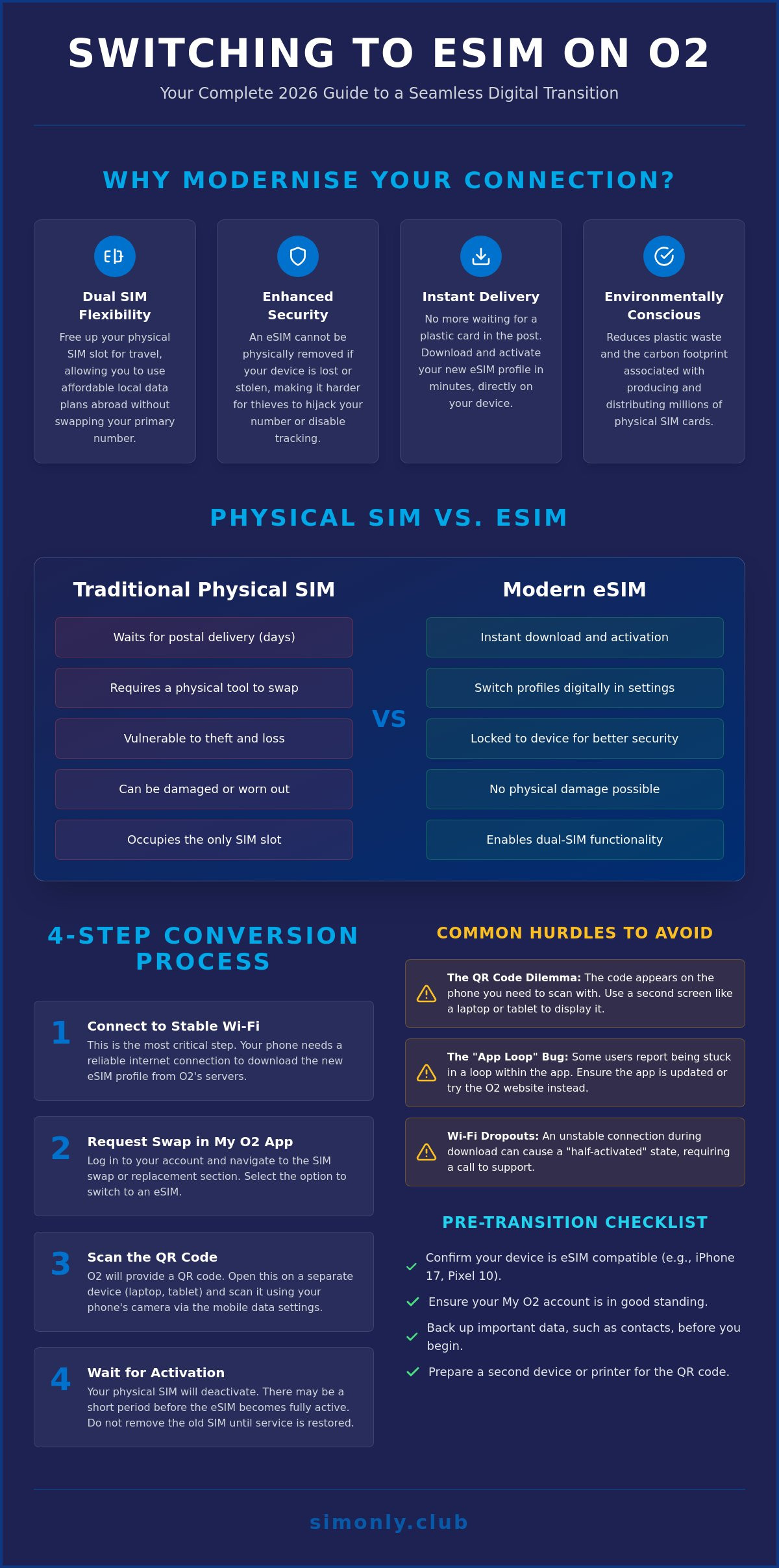
The primary advantage for most users is the newfound flexibility of the dual-SIM setup. By migrating your primary O2 number to an eSIM, you leave the physical SIM slot vacant. This is a game-changer for frequent travellers or business professionals who need to maintain two active lines simultaneously. You can keep your UK number for calls and texts whilst using a local data SIM for affordable browsing abroad. Beyond convenience, there's a vital environmental angle. Reducing the production and postage of plastic SIM cards helps cut down on industrial waste amongst the millions of mobile users in the UK. Additionally, eSIM technology offers a layer of security physical cards simply cannot match. If your phone is lost or stolen, a thief cannot simply pop out the SIM to disable tracking or hijack your number. The profile remains locked to the hardware, making your device a far less appealing target.
The 2026 Mobile Landscape: Is Your Device Ready?
Most flagship handsets released in 2026, including the iPhone 17 series and the Google Pixel 10, are designed with a "digital-first" philosophy. Many of these models have removed the physical tray entirely. To see if your current phone is ready, navigate to your settings menu and look under "Mobile Data" or "Cellular." If you see an option to "Add eSIM" or "Convert to eSIM," you're good to go. Understanding how do eSIMs work is the first step every savvy user should take before making the switch, as it demystifies the cloud-based activation process.
Physical SIM vs eSIM: The Performance Reality
There is a persistent myth that physical SIMs offer better signal quality. This is simply untrue. Both methods use the same O2 network infrastructure and antennas; the only difference is how the network identifies your device. In fact, eSIMs often facilitate faster network switching because they can store multiple profiles at once. You can swap between a work line and a personal line in seconds without ever needing a paperclip. Perhaps the greatest perk is the "instant delivery" factor. Whilst a physical SIM takes days to arrive in the post, an eSIM profile can be downloaded and activated in minutes, putting you back in control of your connectivity immediately.
Step-by-Step: How to Convert Your Physical O2 SIM to an eSIM
Before you begin the process of switching from o2 to esim, ensure your handset is connected to a stable Wi-Fi network. This is the most critical step. Your phone needs an active internet connection to download the new digital profile once the physical SIM is deactivated. If your Wi-Fi drops out mid-download, it can lead to a "half-activated" state that requires a call to customer services. Whether you are using the latest iPhone 17 or a Galaxy S26, the transition relies on a seamless data handshake between your device and O2's servers.
The transition typically begins within the My O2 app. Once you request the swap, O2 will generate a unique QR code. A common hurdle for many users is that the QR code appears on the very screen they need to use for scanning. To solve this, you should open the email on a second device, such as a laptop or tablet; alternatively, you can print the code. When you scan this digital key, your phone communicates with the network to authenticate your identity. This is a great time to consider comparing physical SIMs and eSIMs to appreciate just how much more efficient this digital method is compared to waiting for a letter in the post.
Once the scan is complete, you may experience a short "waiting period" where your physical SIM goes dead before the eSIM fully takes over. This usually lasts only a few minutes, though O2 suggests it can take up to 24 hours in rare cases. You can confirm success by checking your "Mobile Data" or "Cellular" settings. If you see "O2" listed under your SIMs with an active signal bar, your digital transition is complete. If you find the carrier-led process a bit cumbersome, exploring a digital-first unlimited data eSIM can often provide a more streamlined alternative with near-instant activation.
The My O2 App Method: The Digital Shortcut
In the 2026 version of the My O2 app, the interface is designed for speed. Open the app and tap on the "Manage Account" tab. From there, navigate to the "SIM and Device" section and select "Swap My SIM." The app will guide you through a brief identity verification process, usually involving a one-time passcode sent via SMS. If you don't receive the QR code email within ten minutes, check your junk folder or verify that your registered email address is correct in the "Personal Details" menu.
Manual Activation: When the QR Code Fails
If your camera cannot read the QR code, you can enter the details manually. You will need the SM-DP+ Address and the Activation Code, both of which are provided in your O2 confirmation documents. Within your phone's "Add eSIM" menu, select "Enter Details Manually" and copy these strings exactly. Ensure your device's EID (Embedded Identity Document) matches the one registered on your O2 account to prevent security mismatches that could trigger an automated lockout.
Common Hurdles and PAC Codes: What O2 Does Not Always Tell You
While the official instructions for switching from o2 to esim appear seamless, real-world users frequently report technical friction. One of the most common issues is the "App Loop" bug. This occurs when the My O2 app fails to transition from the request phase to the generation phase; instead, it loops the user back to the login screen or a generic error page. If this happens to you, don't panic. It is often a server-side delay rather than a fault with your handset. Clearing your app cache or attempting the request via a desktop browser can sometimes break the cycle and allow the process to continue.
You should also be aware of the 24-hour security lockout. O2 sometimes implements a mandatory pause during a SIM swap to verify the request isn't a fraudulent attempt to hijack your number. This cautious approach is a key part of the UK's digital shift to eSIMs, ensuring that as we move away from physical hardware, our digital identities remain protected. If you find the carrier's internal processes too restrictive or slow, moving your number to a more flexible esim uk provider might be the more efficient path for your 2026 connectivity needs.
The PAC Code Power Play
If the technical hurdles of switching from o2 to esim become too much, you have the legal right to take your number elsewhere. Simply text "PAC" to 65075 from your O2 handset. Under Ofcom regulations, O2 must provide this Porting Authorisation Code within 60 seconds. This code is free, valid for 30 days, and acts as your ticket to freedom. It allows you to maintain your number whilst moving to no contract esim uk plans that offer better value, instant activation, and fewer app-based headaches.
Troubleshooting Activation Delays
If you've scanned your code but "No Service" persists for more than two hours, the "Restart Rule" is your best friend. A hard reboot forces the device to re-handshake with the O2 network masts and refresh the digital profile. If your phone still shows "SOS only," double-check that you haven't accidentally disabled the new eSIM line in your settings. Sometimes, the handset tries to prioritise the old, deactivated physical SIM, leading to a conflict that only a manual setting adjustment can resolve. If you must contact support, try to avoid the lunchtime rush. Calling mid-morning or mid-afternoon generally results in shorter hold times and faster resolutions.
Beyond O2: Comparing the Benefits of Digital-First eSIM Providers
While switching from o2 to esim is a smart move for any tech-savvy user, staying within a traditional network's ecosystem often means accepting long-term contracts and rigid data caps. Digital-first providers have disrupted this model by offering the same hardware-free convenience with significantly more flexibility. Instead of navigating a multi-step request process through a legacy app, you can enjoy instant activation. This allows you to go from choosing a plan to browsing the web in under five minutes. It’s a level of speed that legacy networks, burdened by old infrastructure and complex billing systems, struggle to replicate.
Unlimited Data Without the Red Tape
Many UK residents are moving away from the "Big Four" networks for their primary data needs. Traditional contracts often require a 24-month commitment. This feels restrictive in a fast-moving digital economy where your data needs can change from month to month. By choosing the cheapest unlimited data esim uk plans, you gain the freedom to upgrade, downgrade, or cancel your service whenever you wish. The process of switching from o2 to esim is often just the beginning of a user's journey toward total digital freedom. A popular strategy in 2026 involves using a secondary digital profile as your primary data driver. You can keep your O2 line for essential calls and texts whilst routing all heavy data traffic through a more cost-effective provider. This hybrid approach ensures you maintain your long-standing number without being overcharged for high-speed 5G data usage.
International Freedom: Roaming Done Right
Travel is where the limitations of traditional networks become most apparent. O2’s daily roaming fees can quickly accumulate, even with their fair usage policies in the Europe Zone. In contrast, having a dedicated europe esim profile allows you to access flat-rate local data across the continent without the threat of bill shock. If you're heading further afield, exploring the best esim for usa options ensures you have a reliable connection the moment your plane touches down. These digital-first profiles provide local rates that traditional UK networks simply cannot match. You can manage these profiles directly from your handset settings, toggling them on only when you need them. It is a smarter, more transparent way to handle global connectivity.
Ready to experience a more flexible way to stay connected? Browse our range of unlimited data eSIM plans today.
Making the Leap: Your Checklist for a Seamless eSIM Transition
Before you commit to switching from o2 to esim, a few minutes of preparation can save hours of troubleshooting later. Start by backing up your device to iCloud or Google Drive. SIM transitions are generally smooth; however, having a current snapshot of your data is a vital safety net. Next, verify that your O2 account is in good standing. An unpaid bill or a pending payment can trigger an automated block on SIM swap requests, leaving you in a connectivity limbo. It is also wise to take a screenshot of your current APN (Access Point Name) settings. Whilst most eSIMs configure these automatically, having a visual record allows you to enter the details manually if the automated handshake fails. Finally, decide if you are performing a simple SIM swap to stay with your current provider or a full network switch to a digital-first alternative like SimOnly Club.
The 5-Minute Setup Guide
A stable Wi-Fi connection is your most important tool during the final activation. Once you've scanned your code or entered the details manually, your phone will download the digital profile. You'll know the process is working when your signal bars reappear and the "O2" carrier name shows in your status bar. At this point, you can safely remove the physical plastic card from your tray. Don't throw it away immediately; keep it in a safe place until you've confirmed your new service is fully operational for both calls and data. Run a quick speed test and make a test call to ensure everything is connected exactly as it should be.
Managing Multiple Profiles
Modern handsets allow you to store several digital profiles simultaneously, which is a significant advantage over the old hardware-restricted days. To keep things organised, use the labelling feature in your settings menu to categorise your lines as "Personal", "Work", or "Travel Data". This makes it easy to switch between them without confusion. You can also set specific preferences for which line handles your "Default Voice Line" and which manages your "Mobile Data". This level of control is exactly why so many users are embracing the digital transition and moving away from traditional physical cards. Ready for a better digital experience? Explore our unlimited data eSIM plans.
Take Control of Your Digital Connectivity
The process of switching from o2 to esim is about much more than just ditching a piece of plastic. It represents a shift toward a more agile, secure, and environmentally friendly way to stay connected. You now have the knowledge to navigate the My O2 interface, handle potential activation hurdles, and prepare your device for a flawless transition. By moving to a digital profile, you've gained the ability to manage multiple lines effortlessly whilst protecting your connection from physical theft or damage.
True freedom comes from a service that adapts to your lifestyle without the weight of a 24-month commitment. You can Upgrade to an Unlimited Data eSIM with SimOnly Club today to experience the benefits of instant digital delivery. With unlimited data plans for the UK and roaming, and no hardware contracts or credit checks required, you can get connected in minutes. The digital revolution is here, and you're perfectly positioned to make the most of it. Enjoy your new, hardware-free freedom.
Frequently Asked Questions
Can I switch from a physical O2 SIM to an eSIM and keep my number?
Yes, you can keep your existing mobile number when migrating to a digital profile. The process is handled through the My O2 app or in-store, ensuring your contact details remain unchanged whilst you move away from physical hardware. This is a standard part of the transition for all O2 Pay Monthly and SIM Only customers, providing a seamless way to modernise your handset's connectivity.
How long does it take for an O2 eSIM to activate in 2026?
Most activations are completed within a few minutes of scanning the QR code. However, O2 advises that in some cases, the network handshake can take up to 24 hours to fully process. If your service hasn't restored after two hours, a quick handset restart often forces the connection to refresh. Ensure you remain connected to Wi-Fi until the signal bars for your new profile appear.
What should I do if my O2 eSIM QR code isn’t working?
First, ensure your device is connected to a stable Wi-Fi network before attempting the scan. If the camera fails to read the code, you can enter the SM-DP+ Address and Activation Code manually in your phone's settings. These details are typically included in your confirmation email or My O2 account area. If the manual entry also fails, you may need to request a fresh replacement profile.
Is there a charge for switching from a physical SIM to an eSIM on O2?
There is no additional cost for switching from a physical SIM to an eSIM on the O2 network. It is treated as a standard SIM swap. This makes switching from o2 to esim an affordable way to modernise your connection and free up your physical SIM slot for other uses. You'll continue to pay your existing monthly plan rate without any hidden activation fees.
Can I use an eSIM on O2 if my phone was bought on a contract?
Yes, contract devices are fully compatible with eSIM technology provided the handset supports it. Most modern smartphones bought on O2 Refresh contracts since 2024 are ready for digital profiles. Using an eSIM doesn't affect your handset financing or airtime agreement; it simply changes how you connect to the network. It's a great way to utilise the dual-SIM capabilities of your contract device.
What happens to my O2 eSIM if I factory reset my phone?
A factory reset will typically delete your active eSIM profile unless you specifically select the option to "Keep eSIMs" during the reset process. If the profile is accidentally erased, you'll need to request a replacement QR code through the My O2 app or visit an O2 store with photo ID to restore your service. It's always best to check this setting before confirming a reset.
Do I need a PAC code to switch from O2 to a different eSIM provider?
You only need a PAC (Porting Authorisation Code) if you want to keep your current number whilst moving to a new network. Simply text "PAC" to 65075 to receive your code instantly. This allows you to migrate your number to a more flexible digital-first provider without any service interruptions or loss of contact. Under Ofcom regulations, this code must be provided free of charge within 60 seconds.
Can I have both an O2 physical SIM and a SimOnly Club eSIM active at once?
Yes, most modern handsets support dual SIM functionality, allowing you to run two active lines simultaneously. You can keep your O2 physical SIM for calls and texts whilst using a SimOnly Club eSIM for unlimited data. This setup is particularly useful for managing work and personal lines or for accessing better data rates whilst travelling. You can easily toggle between these profiles in your handset settings.